
Liam's AI Experiment 004: How to Build a Page That Updates Itself
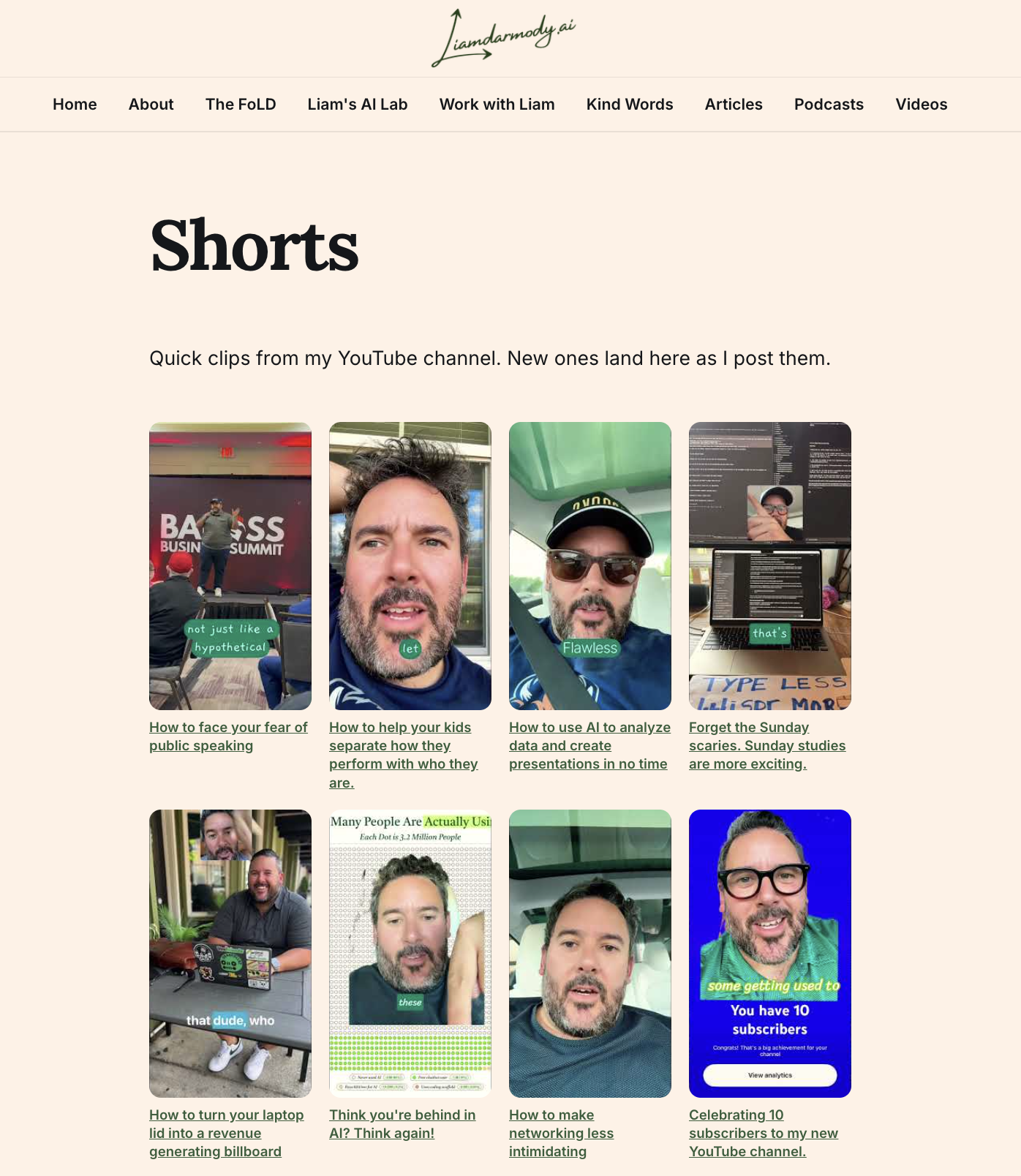
I built a page that collects all 21 of my YouTube Shorts as a thumbnail grid, then set up a monthly check that rebuilds the grid when new Shorts appear. The page maintains itself.
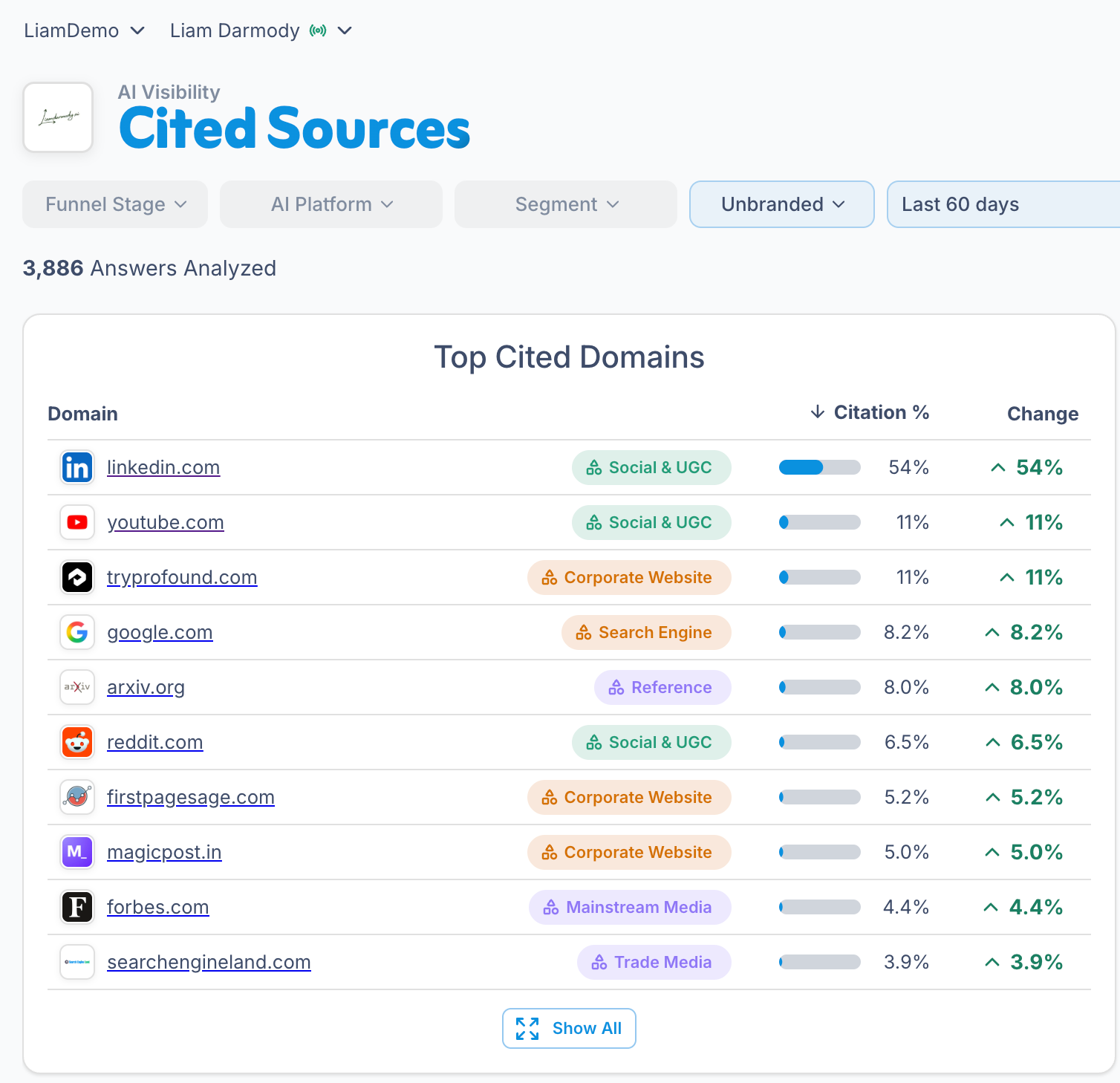
I recently decided to start a YouTube channel (at 43-years-old!) because through my work at Brandi AI, I've seen firsthand how authoritative YouTube is within AI search. Next to LinkedIn, YouTube sits at the very top of most top cited lists.
The Problem I'm Trying to Solve
I post YouTube Shorts and they vanish into the feed. Twenty-three of them now, no single place to point people. So this week's experiment: a page on my site that collects every Short as a thumbnail grid, and then keeps itself updated without me.
The page is live at liamdarmody.ai/shorts. Every Short, one grid, each tile linking straight to YouTube.
How it works
I used Meta's new Muse AI Assistant to help me configure this by making a very simple request:
Is there a way to add my YouTube shorts as a feed on my site?
Of course there is, Shamus (my muse) said.
It then generated a small Python script to ask YouTube for everything on my channel's Shorts tab. No API key, just a command-line tool called yt-dlp reading the public page. The script renders the grid as a single HTML snippet: thumbnail, title, link, repeat. Thumbnails come from YouTube's image server, so there's nothing to host.
That snippet gets pasted into an HTML card on the Ghost page. Once a week, on Monday morning, the script runs again. If it finds new Shorts, the grid rebuilds and the page gets refreshed. If nothing's new, nothing happens.
If at First You Don't Succeed, Try Try Again
The first automated run failed and wiped the page clean. The fetcher couldn't reach YouTube through a network proxy, returned zero Shorts, and the script happily wrote an empty grid over the good one. The fix was a three-line guard:
"if the fetch comes back empty but we had data before, abort and keep the last good grid. Never let a failed check destroy a working page."
The last piece works too: the refresh now pushes straight to the live page with zero involvement from me. The scheduled check finds the new Shorts, rebuilds the grid, and a logged-in browser session swaps the HTML card on the Ghost page and verifies the card count. Most website pages start rotting the day you publish them. This one maintains itself.
Build your own
Want one for your channel? Here's the whole recipe.
You need: Python 3, yt-dlp (pip install yt-dlp), and a site that accepts raw HTML. One note: the weekly run needs a computer that's awake when the schedule fires. A laptop that sleeps through Monday at 9 AM will skip the run.
Step 1: the script. Save this as build_shorts_grid.py, replacing @yourhandle with your channel handle:
#!/usr/bin/env python3
"""Fetch a channel's Shorts and render an HTML grid. No API key needed."""
import html, json, subprocess, sys
from pathlib import Path
HANDLE = "@yourhandle" # <-- change this
OUT = Path("shorts-grid.html")
STATE = Path("shorts-seen.json")
def fetch_shorts():
out = subprocess.run(
["yt-dlp", "--flat-playlist", "--print", "%(id)s\t%(title)s",
f"https://www.youtube.com/{HANDLE}/shorts"],
capture_output=True, text=True, timeout=180)
shorts = []
for line in out.stdout.splitlines():
if "\t" not in line:
continue
vid, title = line.strip().split("\t", 1)
title = title.strip()
if title in ("[Private video]", "[Deleted video]"):
continue
shorts.append({"id": vid, "title": title})
return shorts
def render(shorts):
cards = []
for s in shorts:
title = html.escape(s["title"])
cards.append(
f'<a class="ytg-short" href="https://www.youtube.com/shorts/{s["id"]}" target="_blank" rel="noopener">'
f'<span class="ytg-thumb"><img src="https://i.ytimg.com/vi/{s["id"]}/hqdefault.jpg" alt="{title}" loading="lazy"></span>'
f'<span class="ytg-cap">{title}</span></a>')
return f"""<!-- YouTube Shorts grid: {len(shorts)} shorts -->
<style>
.ytg-grid {{ display:grid; grid-template-columns:repeat(auto-fill,minmax(160px,1fr)); gap:18px; }}
.ytg-short {{ display:block; text-decoration:none; color:inherit; }}
.ytg-thumb {{ display:block; aspect-ratio:9/16; overflow:hidden; border-radius:12px; background:#111; }}
.ytg-thumb img {{ width:100%; height:100%; object-fit:cover; display:block; }}
.ytg-cap {{ display:block; margin-top:8px; font-size:14px; font-weight:600; line-height:1.35; }}
</style>
<div class="ytg-grid">
{chr(10).join(cards)}
</div>"""
def main():
prev = json.loads(STATE.read_text())["shorts"] if STATE.exists() else []
shorts = fetch_shorts()
print(f"Found {len(shorts)} shorts")
if not shorts and prev:
sys.exit("Fetch failed; keeping the last good grid.")
new = [s for s in shorts if s["id"] not in {p["id"] for p in prev}]
if new:
print(f"{len(new)} new since last run:")
[print(" +", s["title"][:60]) for s in new]
OUT.write_text(render(shorts))
STATE.write_text(json.dumps({"shorts": shorts}, indent=1))
if __name__ == "__main__":
main()
Step 2: put it on your site. Run python3 build_shorts_grid.py, open shorts-grid.html, and paste the whole thing into a Ghost HTML card (or any raw-HTML block). Publish.
Step 3: schedule it. Add a cron job to regenerate the file weekly:
0 9 * * 1 cd ~/shorts && python3 build_shorts_grid.py
Every Monday at 9 AM it rebuilds. The script prints how many Shorts are new, so you know whether the page needs a fresh paste. The whole refresh takes about 60 seconds of your time.
Going fully hands-off (optional): create a custom integration in Ghost (Settings, Integrations) to get an Admin API key, then extend the script to push the new HTML into your page's HTML card through the API. That's the one fiddly part, since you have to locate the card inside the page's content JSON.
Worth borrowing: the pattern isn't about Shorts. Anything that accumulates, podcast episodes, press mentions, kind words, can live on a page like this. Build it once, schedule the check, and stop remembering to update it.
My goal heading into the AI Era is to ensure that anything I publish on rented land also gets published on my owned domain at liamdarmody.ai. Setting up systems like this to fetch from other platforms I post on makes that a lot easier to do.
And don't let they python scripts above intimidate you... I didn't know how to do ANY of this kind of stuff and all I did to learn was talk to AI about what I was trying to do and the tools I was using (Shorts + Ghost.org site) and let AI guide me the rest of the way.
If I can do it, you can, too!
Hi5 & Have a great week, friends!
LD
🌶️
Want to try out Muse? Follow this link https://muse.ai/join and redeem my code (7RQG82) in Settings within 48 hours of joining and we'll both get 1 billion Muse tokens.
Want to see how AI sees your brand? Get your complimentary Brandi AI Visibility Audit today!